# CyberSecure by Proofpoint and Cloudflare - Unifi Intrusion Prevention
**URL:** https://community.emergingthreats.net/t/cybersecure-by-proofpoint-and-cloudflare-unifi-intrusion-prevention/2905
**Category:** Wiki
**Tags:** unifi
**Created:** [July 17, 2025, 8:48pm UTC](https://community.emergingthreats.net/t/cybersecure-by-proofpoint-and-cloudflare-unifi-intrusion-prevention/2905 "2025-07-17T20:48:56Z")
**Posts on this page:** 1
**Page:** 1
### Author:  [@ishaughnessy](https://community.emergingthreats.net/u/ishaughnessy)
#### Post date: [July 17, 2025, 8:48pm UTC](https://community.emergingthreats.net/t/cybersecure-by-proofpoint-and-cloudflare-unifi-intrusion-prevention/2905/1 "2025-07-17T20:48:56Z")
# Introduction:
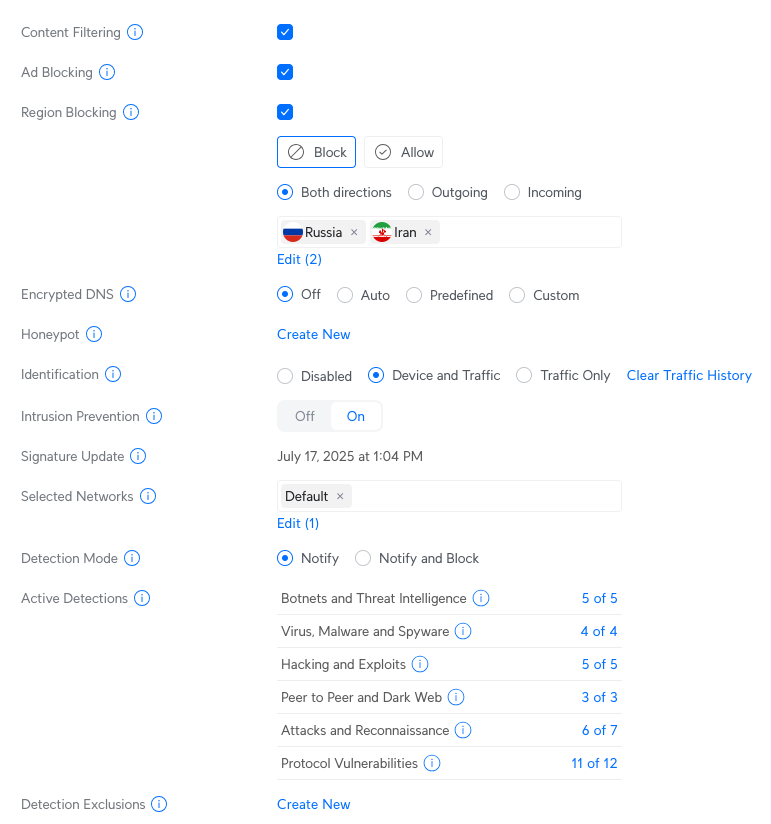
CyberSecure is a service that is available on several Ubiquiti Unifi appliances including the Cloud Gateway devices which are popular within SOHO environments. CyberSecure consists of multiple detection methods which are powered by Cloudflare, Proofpoint, and the Unifi Appliance.
* * *
# Detection Services:
## Cloudflare
- Content Filtering of Malicious/Adult Content Domains
- AdBlocking
## Unifi
- Region Blocking
- Encrypted DNS
- Honeypot
## Proofpoint / Emerging Threats
- Intrusion Prevention
- ET/ETPRO Rulesets
This is what the CyberSecure Configuration settings look like on the Cloud Gateway Control Pane.
* * *
# Which Rules Are Enabled?
Unless you subscribe to “ **CyberSecure Enhanced** ” (which includes ETPRO rules) your appliance will download the standard “ET OPEN” ruleset which is free and available for download [here.](https://rules.emergingthreats.net/) The ruleset is grouped into categories for fine-tuned control. Once Intrusion Prevention is enabled, administrators can select the categories relevant to their environment. Unifi summarizes Emerging Threats rulesets into similar groups so it isn’t immediately clear from the web interface which categories are applied but the console logs will reveal which rules are enabled.
The subsets for each category can be downloaded [here.](https://rules.emergingthreats.net/open/suricata-7.0.3/rules/)

## Console Output (Cleaned Up For Readability)
```auto
"ACTIVEX" then signature = "emerging-activex"
"ADWARE_PUP" then signature = ""
"ATTACK_RESPONSE" then signature = "emerging-attackresponse"
"BOTCC" then signature = "botcc"
"BOTCC.PORTGROUPED" then signature = "botcc-portgrouped"
"CHAT" then signature = "emerging-chat"
"CIARMY" then signature = "ciarmy"
"COINMINER" then signature = ""
"COMPROMISED" then signature = "compromised"
"CURRENT_EVENTS" then signature = ""
"DELETED" then signature = ""
"DNS" then signature = "emerging-dns"
"DOS" then signature = "emerging-dos"
"DROP" then signature = ""
"DSHIELD" then signature = "dshield"
"EXPLOIT" then signature = "emerging-exploit"
"EXPLOIT_KIT" then signature = ""
"FTP" then signature = "emerging-ftp"
"GAMES" then signature = "emerging-games"
"HUNTING" then signature = ""
"ICMP" then signature = "emerging-icmp"
"ICMP_INFO" then signature = "emerging-icmpinfo"
"IMAP" then signature = "emerging-imap"
"INAPPROPRIATE" then signature = "emerging-inappropriate"
"INFO" then signature = "emerging-info"
"JA3" then signature = ""
"MALWARE" then signature = "emerging-malware"
"MISC" then signature = "emerging-misc"
"MOBILE_MALWARE" then signature = "emerging-mobile"
"NETBIOS" then signature = "emerging-netbios"
"P2P" then signature = "emerging-p2p"
"PHISHING" then signature = ""
"POLICY" then signature = "emerging-policy"
"POP3" then signature = "emerging-pop3"
"RPC" then signature = "emerging-rpc"
"SCADA" then signature = "emerging-scada"
"SCADA_SPECIAL" then signature = ""
"SCAN" then signature = "emerging-scan"
"SHELLCODE" then signature = "emerging-shellcode"
"SMTP" then signature = "emerging-smtp"
"SNMP" then signature = "emerging-snmp"
"SQL" then signature = "emerging-sql"
"TELNET" then signature = "emerging-telnet"
"TFTP" then signature = "emerging-tftp"
"THREATVIEW_CS_C2" then signature = ""
"TOR" then signature = "tor"
"user" then signature = "emerging-user"
"VOIP" then signature = "emerging-voip"
"WEB_CLIENT" then signature = "emerging-webclient"
"WEB_SERVER" then signature = "emerging-webserver"
"WEB_SPECIFIC_APPS" then signature = "emerging-webapps"
"WORM" then signature = "emerging-worm"
"TROJAN" then signature = "emerging-trojan"
"UBIQUITI_CUSTOM" then signature = "ubiquiti-custom"
"UBIQUITI_RULES" then signature = "ubiquiti-rules"
```
* * *
# Troubleshooting Detection and Network Interruption
Often times, if there is a service interruption it can be difficult to track down where the problem originates. If detection from Cloudflare and Proofpoint is enabled, who should you contact if you are experiencing a False Positive?
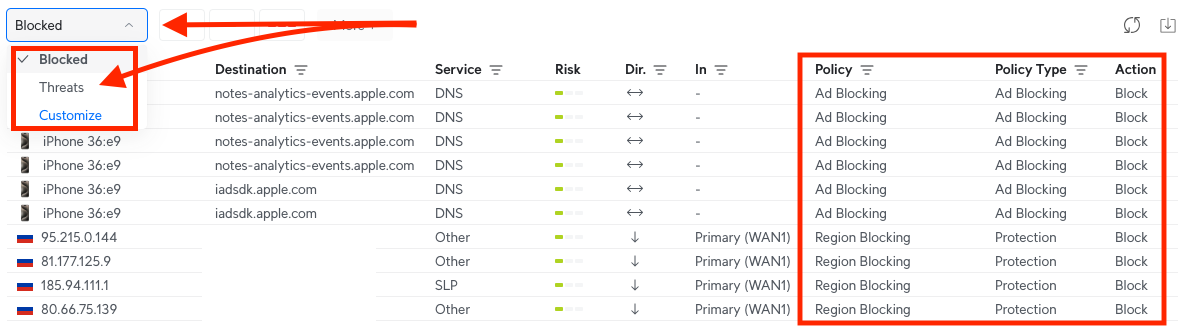
To start your investigation head to the insights tab in the Unifi Webui.

There you will see a dropdown for **Blocked or Threats**. All policy hits that are blocked will show up in the **Blocked** page. This is where you will want to focus if you believe CyberSecure is causing a network issue. If you see a dst IP or domain related to your problem, this will identify which Policy Type is taking action.
* * *
# Investigating a Proofpoint / Emerging Threats Detection
To view IPS alerts navigate to `Insights -> Threats`. This displays events triggered by Intrusion Prevention which shows the rule subset responsible for the alert. For example the `Protocol Vulnerabilities` Policy is causing a significant amount of alerts, you could consider disabling that category from the control pane.

If you want to dig deeper into what the rule is detecting, click on the alert for additional details. From here the Signature ID is displayed which can be used to retrieve the full signature text and description from the ruleset.

* * *
# Signature Issues? Questions? Let Us Know!
If a signature appears to be generating false positives or causing other issues, reach out to us here or on [Twitter](https://x.com/ET_Labs)! If a signature is causing disruption in your network there is a chance other people are experiencing the same problem.
While we perform quality assurance on every signature we release it’s impossible to anticipate what every network environment looks like. We welcome any and all feedback which helps us provide high quality signatures for the community! Likewise, if you have any questions we are happy to discuss our detection logic.
* * *
# Related Unifi Documentation
- [https://help.ui.com/hc/en-us/articles/25930305913751-UniFi-CyberSecure-by-Proofpoint-and-Cloudflare](https://help.ui.com/hc/en-us/articles/25930305913751-UniFi-CyberSecure-by-Proofpoint-and-Cloudflare)
- [https://help.ui.com/hc/en-us/articles/360006893234-UniFi-Gateway-Intrusion-Detection-and-Prevention-IDS-IPS](https://help.ui.com/hc/en-us/articles/360006893234-UniFi-Gateway-Intrusion-Detection-and-Prevention-IDS-IPS)